Important!

Blog moved to https://blog.apdu.fr/

I moved my blog from https://ludovicrousseau.blogspot.com/ to https://blog.apdu.fr/ . Why? I wanted to move away from Blogger (owne...

Friday, February 13, 2015

Debug a smart card reader driver on Yosemite

Since Mac OS X Yosemite (10.10) the pcscd command is no more present. See "OS X Yosemite and smart cards status" for more details.

The problem is that I used this command to get some debug log from my CCID smart card driver. See "pcscd debug output on Mac OS X". Unfortunately this technique is no more available.

com.apple.ifdreader

The /System/Library/CryptoTokenKit/com.apple.ifdreader.slotd/Contents/MacOS/com.apple.ifdreader father process is process 1. Process 1 is launchd "System wide and per-user daemon/agent manager".

If I start the command from a Terminal I get no error message, the command does not return but in the /var/log/system.log file I find:
Feb 10 14:49:57 imac com.apple.ifdreader[37446]: assertion failed: 14C109: libxpc.dylib + 34612 [876216DC-D5D3-381E-8AF9-49AE464E5107]: 0x2d
Feb 10 14:49:57 imac com.apple.ifdreader[37446]: Bogus event on event stream listener.

So I think some parameters and/or context is missing.

The process is started by launchd. The configuration file is /System/Library/LaunchDaemons/com.apple.ifdreader.plist. It contains:
<?xml version="1.0" encoding="UTF-8"?>
<!DOCTYPE plist PUBLIC "-//Apple//DTD PLIST 1.0//EN" "http://www.apple.com/DTDs/PropertyList-1.0.dtd">
<plist version="1.0">
<dict>
 <key>Label</key>
 <string>com.apple.ifdreader</string>
 <key>RunAtLoad</key>
 <false/>
 <key>EnablePressuredExit</key>
 <true/>
 <key>POSIXSpawnType</key>
 <string>Adaptive</string>
 <key>ProgramArguments</key>
 <array>
  <string>/System/Library/CryptoTokenKit/com.apple.ifdreader.slotd/Contents/MacOS/com.apple.ifdreader</string>
 </array>
 <key>LaunchEvents</key>
 <dict>
  <key>com.apple.iokit.matching</key>
  <dict>
   <key>com.apple.ctk.ifdreader.device</key>
   <dict>
    <key>IOMatchLaunchStream</key>
    <true/>
    <key>IOProviderClass</key>
    <string>IOUSBDevice</string>
   </dict>
  </dict>
 </dict>
</dict>
</plist>

Restarting com.apple.ifdreader

After you changed the driver configuration it may be needed to restart the com.apple.ifdreader process.

First you need to stop the process. You can use:
$ sudo killall -SIGKILL -m .*com.apple.ifdreader

Then you need to restart it. Since most smart card reader are USB devices you just need to plug your USB reader and com.apple.ifdreader is (re)started automatically.

Send logs using syslog(3)

If printf(3) can't be used to log messages then the normal option for a daemon is to use syslog(3).

I modified my CCID driver to log messages using syslog(3). This feature will be available in the CCID driver versions 1.4.19 and later.

Get syslog logs

Now that the messages from the CCID driver are sent somewhere we must get them.

We have two options on Mac OS X: a graphical application or a command line tool.

Console application

Apple provides the Console application in /Applications/Utilities/Console.app.
The application icon is:

The application is easy to use. You can filter the output to only have logs from ifdreader.
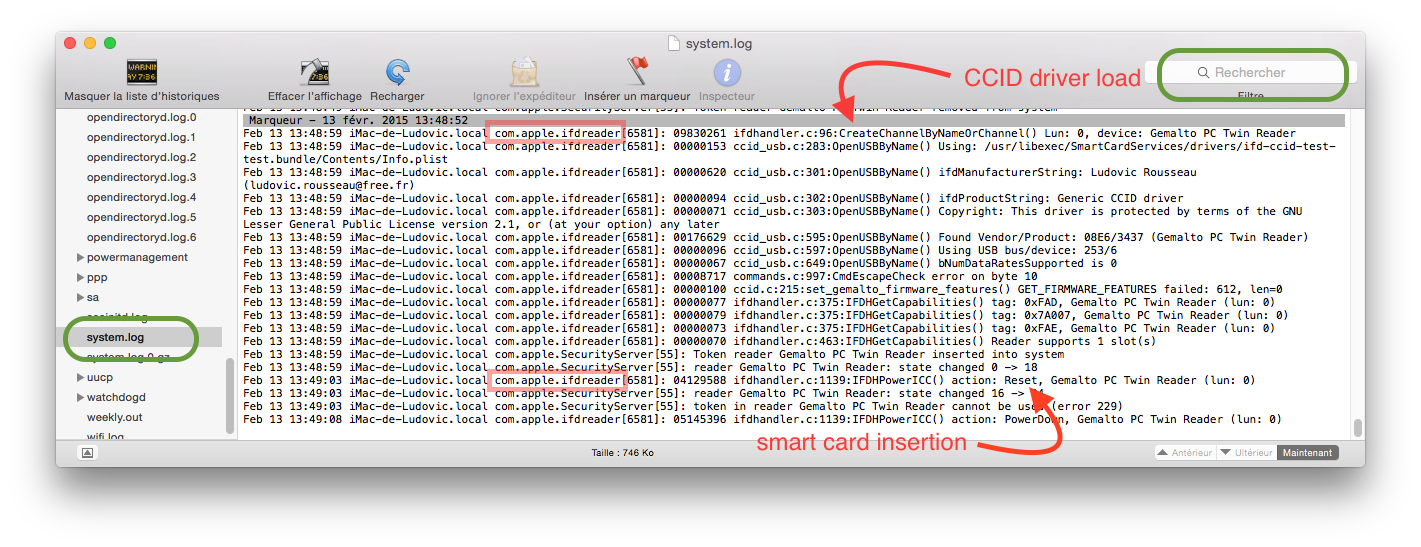

syslog -k Sender com.apple.ifdreader

Another opiont is to use the command line tool syslog(1).

$ syslog -w -k Sender com.apple.ifdreader

Arguments:
  • -w
    The -w option causes syslog to wait for new messages. By default, syslog
    prints the last 10 messages, then waits for new messages to be added to
    the data store.
  • -k
    The -k option may be followed by one, two, or three arguments. A single
    argument causes a match to occur if a message has the specified key,
    regardless of value. If two arguments are specified, a match occurs when
    a message has exactly the specified value for a given key. For example,
    to find all messages sent by the portmap process:
    syslog -k Sender portmap

Sample output

I used lwatch to add colors and ansi2html to convert the ANSI color codes to HTML.

Feb 13 14:04:02 iMac-de-Ludovic.local com.apple.ifdreader[6581] <Warning>: 08676368 ifdhandler.c:96:CreateChannelByNameOrChannel() Lun: 0, device: Gemalto PC Twin Reader
Feb 13 14:04:02 iMac-de-Ludovic.local com.apple.ifdreader[6581] <Warning>: 00000110 ccid_usb.c:283:OpenUSBByName() Using: /usr/libexec/SmartCardServices/drivers/ifd-ccid-test-test.bundle/Contents/Info.plist
Feb 13 14:04:02 iMac-de-Ludovic.local com.apple.ifdreader[6581] <Warning>: 00000637 ccid_usb.c:301:OpenUSBByName() ifdManufacturerString: Ludovic Rousseau (ludovic.rousseau@free.fr)
Feb 13 14:04:02 iMac-de-Ludovic.local com.apple.ifdreader[6581] <Warning>: 00000089 ccid_usb.c:302:OpenUSBByName() ifdProductString: Generic CCID driver
Feb 13 14:04:02 iMac-de-Ludovic.local com.apple.ifdreader[6581] <Warning>: 00000075 ccid_usb.c:303:OpenUSBByName() Copyright: This driver is protected by terms of the GNU Lesser General Public License version 2.1, or (at your option) any later
Feb 13 14:04:02 iMac-de-Ludovic.local com.apple.ifdreader[6581] <Warning>: 00177567 ccid_usb.c:595:OpenUSBByName() Found Vendor/Product: 08E6/3437 (Gemalto PC Twin Reader)
Feb 13 14:04:02 iMac-de-Ludovic.local com.apple.ifdreader[6581] <Warning>: 00000078 ccid_usb.c:597:OpenUSBByName() Using USB bus/device: 253/6
Feb 13 14:04:02 iMac-de-Ludovic.local com.apple.ifdreader[6581] <Warning>: 00000063 ccid_usb.c:649:OpenUSBByName() bNumDataRatesSupported is 0
Feb 13 14:04:02 iMac-de-Ludovic.local com.apple.ifdreader[6581] <Warning>: 00010058 commands.c:997:CmdEscapeCheck error on byte 10
Feb 13 14:04:02 iMac-de-Ludovic.local com.apple.ifdreader[6581] <Warning>: 00000082 ccid.c:215:set_gemalto_firmware_features() GET_FIRMWARE_FEATURES failed: 612, len=0
Feb 13 14:04:02 iMac-de-Ludovic.local com.apple.ifdreader[6581] <Warning>: 00000067 ifdhandler.c:375:IFDHGetCapabilities() tag: 0xFAD, Gemalto PC Twin Reader (lun: 0)
Feb 13 14:04:02 iMac-de-Ludovic.local com.apple.ifdreader[6581] <Warning>: 00000072 ifdhandler.c:375:IFDHGetCapabilities() tag: 0x7A007, Gemalto PC Twin Reader (lun: 0)
Feb 13 14:04:02 iMac-de-Ludovic.local com.apple.ifdreader[6581] <Warning>: 00000072 ifdhandler.c:375:IFDHGetCapabilities() tag: 0xFAE, Gemalto PC Twin Reader (lun: 0)
Feb 13 14:04:02 iMac-de-Ludovic.local com.apple.ifdreader[6581] <Warning>: 00000095 ifdhandler.c:463:IFDHGetCapabilities() Reader supports 1 slot(s)
Feb 13 14:04:02 iMac-de-Ludovic.local com.apple.ifdreader[6581] <Warning>: 00001257 ifdhandler.c:1139:IFDHPowerICC() action: Reset, Gemalto PC Twin Reader (lun: 0)
Feb 13 14:04:09 iMac-de-Ludovic.local com.apple.ifdreader[6581] <Warning>: 06859987 ifdhandler.c:1139:IFDHPowerICC() action: Reset, Gemalto PC Twin Reader (lun: 0)

ATR and APDU logging

Using pcscd it was possible to log APDU sent to the card and the response from the card. This service is now missing since pcscd is no more present.

I added a new option to the CCID driver to log this information. Since it is a sensitive information (you can see the PIN code sent to the card for example) you need the administrative privilege and edit the driver configuration file Info.plist. The configuration file should be /usr/libexec/SmartCardServices/drivers/ifd-ccid.bundle/Contents/Info.plist.

The new option value is 0x0080. You should have some thing like:
   <key>ifdDriverOptions</key>
   <string>0x0080</string>

You will get something like:
Feb 13 15:17:04 iMac-de-Ludovic.local com.apple.ifdreader[11365] <Warning>: 00000076 ifdhandler.c:463:IFDHGetCapabilities() Reader supports 1 slot(s)
Feb 13 15:17:11 iMac-de-Ludovic.local com.apple.ifdreader[11365] <Warning>: 06637507 ifdhandler.c:1139:IFDHPowerICC() action: Reset, Gemalto PC Twin Reader (lun: 0)
Feb 13 15:17:11 iMac-de-Ludovic.local com.apple.ifdreader[11365] <Error>: 00055035 commands.c:249:CmdPowerOn Card absent or mute
Feb 13 15:17:11 iMac-de-Ludovic.local com.apple.ifdreader[11365] <Critical>: 00000171 ifdhandler.c:1206:IFDHPowerICC() PowerUp failed
Feb 13 15:17:15 iMac-de-Ludovic.local com.apple.ifdreader[11365] <Warning>: 04106934 ifdhandler.c:1139:IFDHPowerICC() action: Reset, Gemalto PC Twin Reader (lun: 0)
Feb 13 15:17:15 iMac-de-Ludovic.local com.apple.ifdreader[11365] <Error>: 00055041 commands.c:249:CmdPowerOn Card absent or mute
Feb 13 15:17:15 iMac-de-Ludovic.local com.apple.ifdreader[11365] <Critical>: 00000184 ifdhandler.c:1206:IFDHPowerICC() PowerUp failed
Feb 13 15:17:17 iMac-de-Ludovic.local com.apple.ifdreader[11365] <Warning>: 02376603 ifdhandler.c:1139:IFDHPowerICC() action: Reset, Gemalto PC Twin Reader (lun: 0)
Feb 13 15:17:17 iMac-de-Ludovic.local com.apple.ifdreader[11365] <Error>: 00055065 commands.c:249:CmdPowerOn Card absent or mute
Feb 13 15:17:17 iMac-de-Ludovic.local com.apple.ifdreader[11365] <Critical>: 00000146 ifdhandler.c:1206:IFDHPowerICC() PowerUp failed
Feb 13 15:17:19 iMac-de-Ludovic.local com.apple.ifdreader[11365] <Warning>: 01725812 ifdhandler.c:1139:IFDHPowerICC() action: Reset, Gemalto PC Twin Reader (lun: 0)
Feb 13 15:17:19 iMac-de-Ludovic.local com.apple.ifdreader[11365] <Warning>: ATR: 3B FA 94 00 00 81 31 20 43 80 65 A2 01 01 01 3D 72 D6 43 21 
Feb 13 15:17:23 iMac-de-Ludovic.local com.apple.ifdreader[11365] <Warning>: 03997665 ifdhandler.c:682:IFDHSetProtocolParameters() protocol T=1, Gemalto PC Twin Reader (lun: 0)
Feb 13 15:17:23 iMac-de-Ludovic.local com.apple.ifdreader[11365] <Warning>: 00000099 ifdhandler.c:2073:extra_egt() Extra EGT patch applied
Feb 13 15:17:23 iMac-de-Ludovic.local com.apple.ifdreader[11365] <Warning>: 00040776 ifdhandler.c:1286:IFDHTransmitToICC() Gemalto PC Twin Reader (lun: 0)
Feb 13 15:17:23 iMac-de-Ludovic.local com.apple.ifdreader[11365] <Warning>: APDU: 00 A4 04 00 0A A0 00 00 00 62 03 01 0C 06 01 
Feb 13 15:17:23 iMac-de-Ludovic.local com.apple.ifdreader[11365] <Warning>: SW: 90 00 
Feb 13 15:17:23 iMac-de-Ludovic.local com.apple.ifdreader[11365] <Warning>: 00015578 ifdhandler.c:1286:IFDHTransmitToICC() Gemalto PC Twin Reader (lun: 0)
Feb 13 15:17:23 iMac-de-Ludovic.local com.apple.ifdreader[11365] <Warning>: APDU: 00 00 00 00 
Feb 13 15:17:23 iMac-de-Ludovic.local com.apple.ifdreader[11365] <Warning>: SW: 48 65 6C 6C 6F 20 77 6F 72 6C 64 21 90 00 
Feb 13 15:17:24 iMac-de-Ludovic.local com.apple.ifdreader[11365] <Warning>: 01039858 ifdhandler.c:1139:IFDHPowerICC() action: PowerDown, Gemalto PC Twin Reader (lun: 0)

You can note that the card power up failed 3 times.

The log criticality is available. The default level is <Warning> but can be <Error> or <Critical>.

Conclusion

Getting debug logs of the PC/SC layer is sometimes important to find a problem. I had to modify my CCID driver to add a new log mechanism that works on Yosemite.

[UPDATE]

The ATR and APDU logging is no more needed. See "Debug a smart card application on Yosemite".

[UPDATE 2]

You can change the log level of the com.apple.ifdreader process. See "Change syslog logging level on Yosemite".

Monday, February 9, 2015

OS X Yosemite bug: SCardTransmit returns SCARD_W_UNPOWERED_CARD

This is part of the series: "OS X Yosemite and smart cards: known bugs".

SCardTransmit

SCardTransmit() do not work reliably any more on Yosemite. In some cases using 2 PC/SC applications the functions returns SCARD_W_UNPOWERED_CARD (or 0x0x80100067).

Interpretation

My interpretation is that Apple tried to implement a card auto power off mechanism. I added this feature in pcsc-lite version 1.6.5 from 2010. See "Card auto power on and off".

The card auto power off feature is visible with some smart card readers, like the Gemalto PC Twin (renamed PC USB TR and then renamed IDBridge CT30).


The reader has a LED in it. If the LED blinks then the reader is powered.  If the LED is ON then the smart card is powered.

On Mavericks (and the previous versions of Mac OS X) when you insert a card the LED is ON (unless the reader driver is not found) and stays ON until you remove the card.
On Yosemite when you insert a smart card the LED is ON and after 5 seconds the LED blinks.  This indicates that the card is powered for 5 seconds and then the card is powered off. Great.

Bug

The problem is that the Apple code is bogus. When 2 PC/SC applications are using the smart smart card at the same time the 5 seconds delay before powering off the card is started when the first application releases the card, even if the second application still has an access to the smart card.
After the 5 seconds delay the second application will get a SCARD_W_UNPOWERED_CARD error on the next SCardTransmit() call.

It looks like Apple forgot to power off the card only if NO other PC/SC application is using the card, not just after the first SCardDisconnect().

The sleep(5) in the sample code is important. This is the delay needed for the PC/SC layer to decide to power off the card. You can also remove this delay and wait before you press enter to continue the first execution.

See also

Apple bug report #19764910 "PC/SC: SCardTransmit returns SCARD_W_UNPOWERED_CARD"

The bug has been closed by Apple on 8th April 2015 as fixed in 10.10.3.

Sample code

#include <stdio.h>
#include <stdlib.h>
#include <unistd.h>
#ifdef __APPLE__
#include <PCSC/winscard.h>
#include <PCSC/wintypes.h>
#else
#include <winscard.h>
#endif

int main(int argc, const char * argv[]) {
    SCARDCONTEXT hContext;
    LPSTR mszReaders;
    DWORD err = SCardEstablishContext(SCARD_SCOPE_SYSTEM, NULL, NULL, &hContext);
    if (err != SCARD_S_SUCCESS) {
        printf("ScardEstablishedContext : %08x\n",err);
  return -1;
    }

 DWORD cchReaders = 0;
 err = SCardListReaders(hContext, "SCard$AllReaders", NULL, &cchReaders);
 if (err != 0) {
  printf("ScardListReaders : %08x\n",err);
  return -1;
 }
 mszReaders = calloc(cchReaders, sizeof(char));
 if (!mszReaders) {
  printf("calloc\n");
  return -1;
 }
 err = SCardListReaders(hContext,"SCard$AllReaders", mszReaders, &cchReaders);
 if (err != SCARD_S_SUCCESS) {
  printf("ScardListReaders : %08x\n",err);
  return -1;
 }

 printf("Reader : %s\n", mszReaders);

 SCARDHANDLE hCard;
 DWORD dwActiveProtocol;
 err = SCardConnect(hContext, mszReaders, SCARD_SHARE_SHARED, SCARD_PROTOCOL_T0 | SCARD_PROTOCOL_T1, &hCard, &dwActiveProtocol);
 if (err != SCARD_S_SUCCESS) {
  printf("SCardConnect : %08x\n",err);
  return -1;
 }

 unsigned char cmd[] = {0, 0, 0, 0, 0};
 unsigned char resp[255];
 DWORD resp_len;
 SCARD_IO_REQUEST *pci;

 if (SCARD_PROTOCOL_T0 == dwActiveProtocol)
  pci = SCARD_PCI_T0;
 else
  pci = SCARD_PCI_T1;

 resp_len = sizeof resp;
 err = SCardTransmit(hCard, pci, cmd, sizeof cmd, NULL, resp, &resp_len);
 if (err != SCARD_S_SUCCESS) {
  printf("ScardTransmit: %08x\n",err);
  return -1;
 }
 printf("SCardTransmit: %0X\n", err);

 if (1 == argc)
 {
  printf("Run the second instance\n");
  getchar();
 }

 resp_len = sizeof resp;
 err = SCardTransmit(hCard, pci, cmd, sizeof cmd, NULL, resp, &resp_len);
 if (err != SCARD_S_SUCCESS) {
  printf("ScardTransmit: %08x\n",err);
  return -1;
 }
 printf("SCardTransmit: %0X\n", err);

 SCardDisconnect(hCard, SCARD_LEAVE_CARD);
 SCardReleaseContext(hContext);

 if (argc > 1)
 {
  /* The sleeping time is important here */
  sleep(5);
  printf("Continue the first instance\n");
 }

    return 0;
}

Result (on Yosemite)

$ CFLAGS="-framework PCSC" make main
cc -framework PCSC    main.c   -o main

Since this sample code needs two programs you need to have two Terminal windows opened.
In the first terminal you run ./main and in the second terminal you run ./main a (with an argument).
Once the second execution has finished you press enter in the first terminal to continue the execution of the first program.

1st terminal2nd terminal
$ ./main
Reader : Gemalto PC Twin Reader
SCardTransmit: 0
Run the second instance
$ ./main a
Reader : Gemalto PC Twin Reader
SCardTransmit: 0
SCardTransmit: 0
Continue the first instance
ScardTransmit: 80100067

Expected result (on Debian)

$ CFLAGS=`pkg-config --cflags libpcsclite` LDFLAGS=`pkg-config --libs libpcsclite` make main
cc -pthread -I/usr/include/PCSC    -lpcsclite    main.c   -o main

1st terminal2nd terminal
$ ./main
Reader : Gemalto PC Twin Reader
SCardTransmit: 0
Run the second instance
$ ./main a
Reader : Gemalto PC Twin Reader
SCardTransmit: 0
SCardTransmit: 0
Continue the first instance
ScardTransmit: 0

Known workaround

None known.

One very bad (and untested) solution would be to create an application that sends an APDU (with no side effect) every 3 or 4 seconds so that the 5 seconds delay never occurs. But that is a very very bad solution. And it may be difficult or impossible to find an APDU that would be safe to send at any time.

Update

This bug is now fixed in Mac OS X Yosemite 10.10.3.

Wednesday, January 14, 2015

PCSC sample in Common Lisp

To continue the list of PC/SC wrapper initiated in 2010 with "PC/SC sample in different languages" I now present (or not) a PC/SC sample in Common Lisp.

YstokCard - smart card API

The project is hosted at http://lisp.ystok.ru/ycard/

" YstokCard is a portable Common Lisp library dealing with smart cards.
It allows a Lisp program to interact to integrated chip cards (ICC) and interface devices (IFD, card readers).

Memory cards can securely store relatively small amounts of data. Applications usually require certain conditions to be fulfilled before access to the data is possible, such as a PIN verification or authentication of the card.

Processor cards provide environment for the secure execution of programs. This makes smart cards good candidates for the entire security sector. Additionally, they have a well-established format and are convenient for manual use and handling.

YstokCard can be useful for programming both memory-based and file-based card applications. "

Basic features

  • Class hierarchy for cards and devices.
  • Conventions and macros for defining new card and device types.
  • ATR (Answer-To-Request) converting and analysis.
  • Calls to Smart Card Resource Manager (winscard.dll on Windows, libpcsclite.so on Linux).
  • Helpers like run-length-coding (RLC) etc.

Installation

I tried to install the wrapper on my Debian system with some documentation from the wrapper author himself: Dmitry Ivanov.

I failed to install the wrapper :-(. I am no more a Lisp user and I did not want to invest too much time in setting a working configuration.

Here is the documentation I got from Dmitry Ivanov in case you want to try by yourself:
The wrapper will not work with CLISP but only with:

Build/install means compile and load into a running Lisp system. The
procedure is not a simple "apt-get" call but consists of the manual
operations.

  1. Download zip/tgz bundles for all the dependencies.
  2. Extract all the files.
  3. Load ASDF package manager into the running lisp image by means of
  4. Load all the unzipped ASD-files, i.e. project files, e.g.
    (load "ystok-ffc.asd")
    (load "ystok-library.asd")
    (load "ystokcard.asd")
  5. Evaluate
    (asdf:operate 'asdf:load-op 'ystokcard).

Source code

Since I failed to install the Common Lisp wrapper I could not really write the sample code and test it.

Writing the sample source code is then left as an exercise to the reader :-)

Conclusion

I am sorry I can't really help you on this Common Lisp PC/SC wrapper.

If you are a Common Lisp user I imagine you will succeed in installing the wrapper correctly and using it for your project.

Even if I failed to install it myself I wanted to let you know that a Common Lisp wrapper exist for PC/SC.

Sunday, January 11, 2015

PCSC sample in PHP5

In PC/SC sample in different languages I "promised" to give the implementation of the same sample program in many different programming languages.

SCardSCR

In a previous article "PCSC sample in PHP" I wrote about SCardSCR.

SCardSCR is a project for Windows by Johann Dantant. The project web site is no more available because the domain name www.waazaa.org do not exist any more.

A user reported the problem to me and asked where the web site was available. I used a web search service to find were the project SCardSCR had been moved but I found a new PHP PC/SC wrapper instead.

PC/SC for PHP

PC/SC for PHP is the continuation of SCardSCR by Marco Schuster and Johannes Findeisen and is licensed under the PHP license:
This code is licensed under the terms of the PHP License version 3.01. PCSC-Lite is licensed in a way where it is possible to integrate it native in the PHP environment.

The project is hosted at http://hanez.org/pcsc-for-php.html and is also available at http://pecl.php.net/package/pcsc.

From the project About section:
This is the only extension for using PC/SC based smart cards with PHP. It is a wrapper to the wonderful and free project PCSC-Lite which is the middleware to access a smart card using SCard API (PC/SC). Since PCSC-Lite is compatible to the winscard API it should be possible to compile this extension using a Windows(R) operating system. Currently I only take focus on Linux environments.

Thanks are going to Johann Dantant! He provides a PC/SC extension for PHP since 2005 and I reused some of his code. He allowed me to relicense these parts under the terms of the PHP license so I could integrate PCSC-Lite natively into PHP. You find his work here.
Latest version is 0.3 released 2014-04-23

Since the project is hosted inside the PECL (PHP Extension Community Library) I guess/hope the "PC/SC for PHP" project will not disapear soon. From http://pecl.php.net/
PECL is a repository for PHP Extensions, providing a directory of all known extensions and hosting facilities for downloading and development of PHP extensions.

API

The API is documented at PC/SC for PHP - An extension for PHP using the winscard PC/SC API.

I note some missing PC/SC features:

Bug

I had to patch the code to add support of T=0 cards.
Index: pcsc.c
===================================================================
--- pcsc.c (révision 335717)
+++ pcsc.c (copie de travail)
@@ -590,7 +590,7 @@ PHP_FUNCTION(scard_list_readers)
    Return a handle to the card */
 PHP_FUNCTION(scard_connect)
 {
-  DWORD dwPreferredProtocol = SCARD_PROTOCOL_T1; 
+  DWORD dwPreferredProtocol = SCARD_PROTOCOL_T0 | SCARD_PROTOCOL_T1; 
   DWORD dwCurrentProtocol;
   SCARDHANDLE hCard = 0;
   LONG rc = 0;

Installation

The installation on Debian is quiet easy.

I had to install the Debian packages:
  • php-pear to get the pecl(1) command
  • php5-dev to get the phpize(1) command (prepare a PHP extension for compiling)

$ sudo pecl install pcsc-alpha
downloading pcsc-0.3.tgz ...
Starting to download pcsc-0.3.tgz (8,939 bytes)
.....done: 8,939 bytes
4 source files, building
running: phpize
Configuring for:
PHP Api Version:         20131106
Zend Module Api No:      20131226
Zend Extension Api No:   220131226
building in /tmp/pear/temp/pear-build-rootMiAGhV/pcsc-0.3
running: /tmp/pear/temp/pcsc/configure
checking for grep that handles long lines and -e... /bin/grep
checking for egrep... /bin/grep -E
checking for a sed that does not truncate output... /bin/sed

[...]

libtool: finish: PATH="/usr/bin:/usr/local/sbin:/usr/local/bin:/usr/sbin:/usr/bin:/sbin:/bin:/sbin" ldconfig -n /tmp/pear/temp/pear-build-rootMiAGhV/pcsc-0.3/modules
----------------------------------------------------------------------
Libraries have been installed in:
   /tmp/pear/temp/pear-build-rootMiAGhV/pcsc-0.3/modules

If you ever happen to want to link against installed libraries
in a given directory, LIBDIR, you must either use libtool, and
specify the full pathname of the library, or use the `-LLIBDIR'
flag during linking and do at least one of the following:
   - add LIBDIR to the `LD_LIBRARY_PATH' environment variable
     during execution
   - add LIBDIR to the `LD_RUN_PATH' environment variable
     during linking
   - use the `-Wl,-rpath -Wl,LIBDIR' linker flag
   - have your system administrator add LIBDIR to `/etc/ld.so.conf'

See any operating system documentation about shared libraries for
more information, such as the ld(1) and ld.so(8) manual pages.
----------------------------------------------------------------------

Build complete.
Don't forget to run 'make test'.

running: make INSTALL_ROOT="/tmp/pear/temp/pear-build-rootMiAGhV/install-pcsc-0.3" install
Installing shared extensions:     /tmp/pear/temp/pear-build-rootMiAGhV/install-pcsc-0.3/usr/lib/php5/20131226/
Installing header files:          /tmp/pear/temp/pear-build-rootMiAGhV/install-pcsc-0.3/usr/include/php5/
running: find "/tmp/pear/temp/pear-build-rootMiAGhV/install-pcsc-0.3" | xargs ls -dils
305074  4 drwxr-xr-x 3 root root  4096 janv. 11 14:21 /tmp/pear/temp/pear-build-rootMiAGhV/install-pcsc-0.3
305078  4 drwxr-xr-x 4 root root  4096 janv. 11 14:21 /tmp/pear/temp/pear-build-rootMiAGhV/install-pcsc-0.3/usr
305082  4 drwxr-xr-x 3 root root  4096 janv. 11 14:21 /tmp/pear/temp/pear-build-rootMiAGhV/install-pcsc-0.3/usr/include
305083  4 drwxr-xr-x 2 root root  4096 janv. 11 14:21 /tmp/pear/temp/pear-build-rootMiAGhV/install-pcsc-0.3/usr/include/php5
276538  4 -rw-r--r-- 1 root root  1238 janv. 11 14:21 /tmp/pear/temp/pear-build-rootMiAGhV/install-pcsc-0.3/usr/include/php5/php_pcsc.h
305079  4 drwxr-xr-x 3 root root  4096 janv. 11 14:21 /tmp/pear/temp/pear-build-rootMiAGhV/install-pcsc-0.3/usr/lib
305080  4 drwxr-xr-x 3 root root  4096 janv. 11 14:21 /tmp/pear/temp/pear-build-rootMiAGhV/install-pcsc-0.3/usr/lib/php5
305081  4 drwxr-xr-x 2 root root  4096 janv. 11 14:21 /tmp/pear/temp/pear-build-rootMiAGhV/install-pcsc-0.3/usr/lib/php5/20131226
276304 60 -rwxr-xr-x 1 root root 60896 janv. 11 14:21 /tmp/pear/temp/pear-build-rootMiAGhV/install-pcsc-0.3/usr/lib/php5/20131226/pcsc.so

Build process completed successfully
Installing '/usr/lib/php5/20131226/pcsc.so'
Installing '/usr/include/php5/php_pcsc.h'
install ok: channel://pecl.php.net/pcsc-0.3
configuration option "php_ini" is not set to php.ini location
You should add "extension=pcsc.so" to php.ini

I had to edit the file /etc/php5/cli/php.ini to change the enable_dl definition:
; Whether or not to enable the dl() function.  The dl() function
; does NOT work properly in multithreaded servers, such as IIS or Zeus,
; and is automatically disabled on them.
; http://php.net/enable-dl
;enable_dl = Off
enable_dl = On

Source code

<?php

if (!extension_loaded('pcsc')) {
  dl('pcsc.so');
}

# Get a PC/SC context
$context = scard_establish_context();
//var_dump($context);

# Get the reader list
$readers = scard_list_readers($context);
//var_dump($readers);

# Use the first reader
$reader = $readers[0];
echo "Using reader: ", $reader, "\n";

# Connect to the card
$connection = scard_connect($context, $reader);
//var_dump($connection);

# Select Applet APDU
$CMD = "00A404000AA00000006203010C0601";
$res = scard_transmit($connection, $CMD);
var_dump($res);

# test APDU
$CMD = "00000000";
$res = scard_transmit($connection, $CMD);
var_dump($res);
echo pack("H*", $res), "\n";

# Release the PC/SC context
scard_release_context($context);

?>

Output

$ php sample.php 
Using reader: Gemalto PC Twin Reader 00 00
string(4) "9000"
string(28) "48656C6C6F20776F726C64219000"
Hello world!�

Conclusion

I have only tested the wrapper using the command line php5 program. I guess the wrapper should also be available from a PHP script in a HTML page hosted by a web server. In that case the PC/SC commands are executed on the server. I don't know what it can be used for. In general you want to use the smart card on the client side.

Happy hacking with this PHP PC/SC wrapper.

Tuesday, January 6, 2015

OS X Yosemite bug: T=0 is used instead of T=1 on dual protocol cards

This is part of the series: "OS X Yosemite and smart cards: known bugs".

SCardConnect(..., SCARD_PROTOCOL_T0 | SCARD_PROTOCOL_T1, ...)

SCardConnect() has changed its preferred protocol on Yosemite.

If a smart card can do both protocols T=0 and T=1 it is possible to let SCardConnect() select the active protocol. T=1 has some advantages over T=0 (transparent support of extended APDU for example) so it is a good idea for a PC/SC layer to prefer T=1 over T=0.

On Mavericks (Mac OS X 10.9) the T=1 protocol was preferred over T=0. On Yosemite this has changed and T=0 is preferred now.

It is not really a bug since by using SCARD_PROTOCOL_T0 | SCARD_PROTOCOL_T1 the application explicitly let the PC/SC layer to select the protocol. But it is a change compared to the previous OS X version and can be considered a regression.

I guess the behaviour change is due to the major rewrite of the PC/SC layer in Yosemite. See "OS X Yosemite and smart cards status".

ATR parsing

You can use my online ATR (Answer To Reset) parsing tool at Smart card ATR parsing. For my tests I use a smart card with the ATR: 3B D6 18 00 80 B1 80 6D 1F 03 80 51 00 61 10 30 9E. You can see the ATR parsing results at http://smartcard-atr.appspot.com/parse?ATR=3BD6180080B1806D1F038051006110309E.

In the case of my smart card you can see from the parsing results that both protocols are supported:
[...]
TD(1) = 0x80 Y(i+1) = b1000, Protocol T=0
----
TD(2) = 0xB1 Y(i+1) = b1011, Protocol T=1
[...]


See also

Apple bug report #19384330 "PC/SC SCardConnect(): T=0 is used instead of T=1 on dual protocol cards". Closed by Apple, 9th January 2015, as a duplicated of #18567029.

Sample code

The sample code does:
  1. connect using SCardConnect(..., SCARD_PROTOCOL_T0 | SCARD_PROTOCOL_T1, ...)
  2. display the protocol selected by SCardConnect()
  3. display the ATR so you can feed it to Smart card ATR parsing

#include <stdio.h>
#include <stdlib.h>
#include <string.h>
#ifdef __APPLE__
#include <PCSC/winscard.h>
#include <PCSC/wintypes.h>
#else
#include <winscard.h>
#endif

int main(int argc, const char * argv[]) {
    SCARDCONTEXT hContext;
    LPSTR mszReaders;
    DWORD err = SCardEstablishContext(SCARD_SCOPE_SYSTEM, NULL, NULL, &hContext);
    if (err != SCARD_S_SUCCESS) {
        printf("ScardEstablishedContext : %08x\n",err);
  return -1;
    }

 DWORD cchReaders = 0;
 err = SCardListReaders(hContext, "SCard$AllReaders", NULL, &cchReaders);
 if (err != 0) {
  printf("ScardListReaders : %08x\n",err);
  return -1;
 }
 mszReaders = calloc(cchReaders, sizeof(char));
 if (!mszReaders) {
  printf("calloc\n");
  return -1;
 }
 err = SCardListReaders(hContext,"SCard$AllReaders", mszReaders, &cchReaders);
 if (err != SCARD_S_SUCCESS) {
  printf("ScardListReaders : %08x\n",err);
  return -1;
 }

 printf("Reader : %s\n", mszReaders);

 SCARDHANDLE hCard;
 DWORD dwActiveProtocol;
 err = SCardConnect(hContext, mszReaders, SCARD_SHARE_SHARED, SCARD_PROTOCOL_T0 | SCARD_PROTOCOL_T1, &hCard, &dwActiveProtocol);
 if (err != SCARD_S_SUCCESS) {
  printf("SCardConnect: 0x%08x\n",err);
  return -1;
 }

 printf("Prococol: ");
 switch(dwActiveProtocol)
 {
  case SCARD_PROTOCOL_T0:
   printf("SCARD_PROTOCOL_T0\n");
   break;
  case SCARD_PROTOCOL_T1:
   printf("SCARD_PROTOCOL_T1\n");
   break;
  default:
   printf("unknown\n");
 }

 char name[100];
 DWORD len = sizeof name;
 DWORD dwState, dwProtocol;
 unsigned char atr[MAX_ATR_SIZE];
 DWORD atr_len = sizeof atr;
 err = SCardStatus(hCard, name, &len, &dwState, &dwProtocol, atr, &atr_len);
 if (err != SCARD_S_SUCCESS) {
  printf("SCardStatus: 0x%08x\n",err);
  return -1;
 }
 printf("ATR: ");
 for (int i=0; i<atr_len; i++)
  printf("%02X ", atr[i]);
 printf("\n");

 SCardDisconnect(hCard, SCARD_LEAVE_CARD);
 SCardReleaseContext(hContext);

    return 0;
}

Result (on Yosemite)

$ CFLAGS="-framework PCSC" make main
cc -framework PCSC    main.c   -o main

$ ./main
Reader : Gemalto PC Twin Reader
Prococol: SCARD_PROTOCOL_T0
ATR: 3B D6 18 00 80 B1 80 6D 1F 03 80 51 00 61 10 30 9E

T=0 (SCARD_PROTOCOL_T0) has been selected.

Expected result (on Mavericks)

$ CFLAGS="-framework PCSC" make main
cc -framework PCSC    main.c   -o main

$ ./main
Reader : Gemplus GemPC Twin 00 00
Prococol: SCARD_PROTOCOL_T1
ATR: 3B D6 18 00 80 B1 80 6D 1F 03 80 51 00 61 10 30 9E

T=1 (SCARD_PROTOCOL_T1) has been selected.

Known workaround

Force the use of T=1 only on dual protocol cards it you really want to use T=1 instead of T=0.

You have to parse the ATR to know if the card supports T=0 and/or T=1. This is not an easy task. Maybe it is simpler to first call SCardConnect(..., SCARD_PROTOCOL_T1, ...) and if that fails call SCardConnect(..., SCARD_PROTOCOL_T0, ...).

Note that in case of protocol not supported the error returned is SCARD_E_NOT_TRANSACTED on Yosemite but SCARD_E_PROTO_MISMATCH on Mavericks. See OS X Yosemite bug: SCARD_E_PROTO_MISMATCH not returned.

Update

This bug is now fixed in Mac OS X Yosemite 10.10.2.

OS X Yosemite bug: SCARD_E_PROTO_MISMATCH not returned

This is part of the series: "OS X Yosemite and smart cards: known bugs".

SCARD_E_PROTO_MISMATCH not returned by SCardConnect()

In case of card communication protocol not supported, SCardConnect() returns the error SCARD_E_NOT_TRANSACTED on Yosemite but the error code is SCARD_E_PROTO_MISMATCH on Mavericks (and also on pcsc-lite on GNU/Linux).

This is a regression from Mavericks. I guess the same problem is also present with SCardReconnect().

SCARD_E_NOT_TRANSACTED should not be the error code for any error. SCARD_E_PROTO_MISMATCH is the correct error code to return in this case.

See also

Apple bug report #19384251 "PC/SC: SCARD_E_PROTO_MISMATCH not returned by SCardConnect()". Closed by Apple, 9th January 2015, as a duplicated of #18689292.

Sample code

The sample code uses SCardConnect(.., SCARD_PROTOCOL_T1, ..) to force the use of T=1. If you insert a T=0 only card you will get an error code from SCardConnect().

#include <stdio.h>
#include <stdlib.h>
#include <string.h>
#ifdef __APPLE__
#include <PCSC/winscard.h>
#include <PCSC/wintypes.h>
#else
#include <winscard.h>
#endif

int main(int argc, const char * argv[]) {
    SCARDCONTEXT hContext;
    LPSTR mszReaders;
    DWORD err = SCardEstablishContext(SCARD_SCOPE_SYSTEM, NULL, NULL, &hContext);
    if (err != SCARD_S_SUCCESS) {
        printf("ScardEstablishedContext : %08x\n",err);
  return -1;
    }

 DWORD cchReaders = 0;
 err = SCardListReaders(hContext, "SCard$AllReaders", NULL, &cchReaders);
 if (err != 0) {
  printf("ScardListReaders : %08x\n",err);
  return -1;
 }
 mszReaders = calloc(cchReaders, sizeof(char));
 if (!mszReaders) {
  printf("calloc\n");
  return -1;
 }
 err = SCardListReaders(hContext,"SCard$AllReaders", mszReaders, &cchReaders);
 if (err != SCARD_S_SUCCESS) {
  printf("ScardListReaders : %08x\n",err);
  return -1;
 }

 printf("Reader : %s\n", mszReaders);

 SCARDHANDLE hCard;
 DWORD dwActiveProtocol;
 err = SCardConnect(hContext, mszReaders, SCARD_SHARE_SHARED, SCARD_PROTOCOL_T1, &hCard, &dwActiveProtocol);
 if (err != SCARD_S_SUCCESS) {
  printf("SCardConnect: 0x%08x\n",err);
  return -1;
 }

 SCardDisconnect(hCard, SCARD_LEAVE_CARD);
 SCardReleaseContext(hContext);

    return 0;
}

Result (on Yosemite)

$ CFLAGS="-framework PCSC" make main
cc -framework PCSC    main.c   -o main

$ ./main
Reader : Gemalto PC Twin Reader
SCardConnect: 0x80100016

0x80100016 is SCARD_E_NOT_TRANSACTED.

Expected result (on Mavericks)

$ CFLAGS="-framework PCSC" make main
cc -framework PCSC    main.c   -o main

$ ./main
Reader : Gemplus GemPC Twin 00 00
SCardConnect: 0x8010000f

0x8010000f is SCARD_E_PROTO_MISMATCH.

Known workaround

You should expect the error SCARD_E_NOT_TRANSACTED instead of SCARD_E_PROTO_MISMATCH on Yosemite.

On Yosemite it is no more possible to decide if SCARD_E_NOT_TRANSACTED is returned because the requested protocol is not supported or because another error has occurred.

Update

This bug is now fixed in Mac OS X Yosemite 10.10.2.

Monday, January 5, 2015

OS X Yosemite bug: PC/SC functions crash after a fork(2)

This is part of the series: "OS X Yosemite and smart cards: known bugs".

All (?) PC/SC functions

SCardxx() do not work on Yosemite if executed in a son process of the one that has executed SCardEstablishContext().

This happen if SCardEstablishContext() is exected and then the process is forked. The PC/SC functions used in the son using the hContext received by the SCardEstablishContext() in the parent process will crash.

I verified this behaviour only with SCardListReaders() and SCardConnect(). I would not be surprised if it is the case for all PC/SC functions (except SCardEstablishContext() of course).

Using a PC/SC context in a son process after a fork(2) may not be supported by the PC/SC API. The support of such a use case has changed in the official pcsc-lite. The current version (pcsc-lite 1.8.13) will support it but be sure to not use the PC/SC handle in the parent process if you want to use it in the son process (or you will have problems).
In the case of Yosemite the PC/SC function will even crash instead of returning an error code.

See also

Apple bug report #19374107 "PC/SC functions crash after a fork(2)".

"com.apple.pcsc Crashes in SCardDisconnect / transact / libdispatch / fork resource handling code" https://smartcardservices.macosforge.org/trac/ticket/141.

"OpenVPN Crashes in OpenSC pcsc_disconnect on OSX 10.10 Yosemite" https://github.com/OpenSC/OpenSC/issues/333.

Sample code

#include <stdio.h>
#include <unistd.h>
#ifdef __APPLE__
#include <PCSC/winscard.h>
#include <PCSC/wintypes.h>
#else
#include <winscard.h>
#endif

int main(int argc, const char * argv[]) {
 SCARDCONTEXT hContext;
 DWORD err = SCardEstablishContext(SCARD_SCOPE_SYSTEM, NULL, NULL, &hContext);
 if (err != SCARD_S_SUCCESS) {
  printf("ScardEstablishedContext: 0x%08x\n",err);
  return -1;
 }

 pid_t pid = fork();
 printf("%s:%d %d\n", __FILE__, __LINE__, pid);
 if (0 == pid)
 {
  /* son process */
  printf("Before\n");
  DWORD cchReaders = 0;
  err = SCardListReaders(hContext, "SCard$AllReaders", NULL, &cchReaders);
  if (err != 0) {
   printf("ScardListReaders: 0x%08x\n",err);
   return -1;
  }
  printf("Has not crashed: %X\n", err);
 }
 else
 {
  /* give some time to the son */
  sleep(1);
 }

 SCardReleaseContext(hContext);

 return 0;
}


Result (on Yosemite)

$ CFLAGS="-framework PCSC" make main
cc -framework PCSC    main.c   -o main

$ ./main
main.c:19 8236
main.c:19 0
Before

I could not generate a crash dump or a backtrace using lldb.
You can see that the line "Has not crashed: xx" is NOT displayed. The function SCardListReaders() has crashed and has not returned.

I can reproduce the problem and generate a crash dump using the pcsc-lite unitary test SCard_fork.py. This is less easy to use since you have to install the PC/SC Python wrapper pyscard first.

The crash dump is then:
Process:               Python [8270]
Path:                  /System/Library/Frameworks/Python.framework/Versions/2.7/Resources/Python.app/Contents/MacOS/Python
Identifier:            Python
Version:               2.7.6 (2.7.6)
Code Type:             X86-64 (Native)
Parent Process:        Python [8268]
Responsible:           Terminal [450]
User ID:               501

PlugIn Path:             /Library/Python/2.7/site-packages/smartcard/scard/_scard.so
PlugIn Identifier:       _scard.so
PlugIn Version:          ??? (0)

Date/Time:             2015-01-05 15:54:21.335 +0100
OS Version:            Mac OS X 10.10.1 (14B25)
Report Version:        11
Anonymous UUID:        7FE6A9DE-5002-1B38-88FE-227046540C73

Sleep/Wake UUID:       99799303-CF96-4849-9024-4B487D8B2393

Time Awake Since Boot: 7600 seconds
Time Since Wake:       3600 seconds

Crashed Thread:        0  Dispatch queue: com.apple.main-thread

Exception Type:        EXC_BAD_ACCESS (SIGSEGV)
Exception Codes:       KERN_INVALID_ADDRESS at 0x0000000000000110

VM Regions Near 0x110:
--> 
    __TEXT                 000000010837b000-000000010837c000 [    4K] r-x/rwx SM=COW  /System/Library/Frameworks/Python.framework/Versions/2.7/Resources/Python.app/Contents/MacOS/Python

Application Specific Information:
crashed on child side of fork pre-exec

Thread 0 Crashed:: Dispatch queue: com.apple.main-thread
0   libdispatch.dylib      0x00007fff8ddae5d2 _dispatch_queue_wakeup_with_qos_slow + 525
1   libdispatch.dylib      0x00007fff8ddae5f8 _dispatch_queue_wakeup_with_qos_slow + 563
2   libdispatch.dylib      0x00007fff8dda3cfc _dispatch_mach_msg_send + 1690
3   libdispatch.dylib      0x00007fff8dda35e4 dispatch_mach_send + 326
4   libxpc.dylib           0x00007fff887048b1 _xpc_connection_send_message_with_reply_f + 125
5   libxpc.dylib           0x00007fff887047c2 xpc_connection_send_message_with_reply_sync + 185
6   com.apple.pcsc         0x00000001086fec5b transact + 604
7   com.apple.pcsc         0x00000001086ffe73 SCardListReaders + 140
8   _scard.so              0x00000001086ec6a5 _wrap_SCardListReaders + 181 (scard_wrap.c:3401)
9   org.python.python      0x0000000108407180 PyEval_EvalFrameEx + 12778
10  org.python.python      0x0000000108403d62 PyEval_EvalCodeEx + 1413
11  org.python.python      0x000000010840a57d 0x108380000 + 566653
12  org.python.python      0x00000001084073e3 PyEval_EvalFrameEx + 13389
13  org.python.python      0x0000000108403d62 PyEval_EvalCodeEx + 1413
14  org.python.python      0x00000001084037d7 PyEval_EvalCode + 54
15  org.python.python      0x00000001084237bd 0x108380000 + 669629
16  org.python.python      0x0000000108423860 PyRun_FileExFlags + 133
17  org.python.python      0x00000001084233fd PyRun_SimpleFileExFlags + 769
18  org.python.python      0x0000000108434b23 Py_Main + 3051
19  libdyld.dylib          0x00007fff8ca555c9 start + 1

Thread 0 crashed with X86 Thread State (64-bit):
  rax: 0x0000000000000000  rbx: 0x00007f97b2517a50  rcx: 0x0000000000000100  rdx: 0x0000000000000001
  rdi: 0x00007f97b244f620  rsi: 0x0000000000000001  rbp: 0x00007fff57883990  rsp: 0x00007fff57883960
   r8: 0x0000000000000006   r9: 0x00000000fffff000  r10: 0x00007fff7584b244  r11: 0x0000000000000206
  r12: 0x0000000000000001  r13: 0x00007f97b244f620  r14: 0x0000000000001000  r15: 0x00007fff76583bc0
  rip: 0x00007fff8ddae5d2  rfl: 0x0000000000010206  cr2: 0x0000000000000110
  
Logical CPU:     1
Error Code:      0x00000006
Trap Number:     14

Expected result (on Debian)

$ CFLAGS=`pkg-config --cflags libpcsclite` LDFLAGS=`pkg-config --libs libpcsclite` make main
cc -pthread -I/usr/include/PCSC    -lpcsclite    main.c   -o main

$ ./main
main.c:19 2274
main.c:19 0
Before
Has not crashed: 0

Here the line "Has not crashed: 0" is displayed and SCardListReaders() returned SCARD_S_SUCCESS.

Known workaround

Do not share a PC/SC context between a father process and its sons. It is a dangerous use the of PC/SC API. In the case of Yosemite it will even make your application crash.

Update, 4 April 2015

A reader signals that the Mac OS X behaviour is normal according to fork(2) manpage.

CAVEATS
There are limits to what you can do in the child process. To be totally safe you should restrict yourself to only executing async-signal safe operations until such time as one of the exec functions is called. All APIs, including global data symbols, in any framework or library should be assumed to be unsafe after a fork() unless explicitly documented to be safe or async-signal safe. If you need to use these frameworks in the child process, you must exec. In this situation it is reasonable to exec yourself.

Mavericks

Maybe it is an expected behaviour. But it is a regression compared to Mavericks (Mac OS X 10.9).

On Mavericks the output is:
$ ./main
a.c:19 2297
a.c:19 0
Before
Has not crashed: 0

Update, 14 November 2015

Answer from Apple to my bug report:
Please know this is intended behavior. Please review the CAVEATS section in the fork() manpage.

To clarify: It is intended that the results are undefined & unsupported for using Darwin APIs beyond the POSIX standard in a forked child of a parent process that had also used Darwin APIs beyond the POSIX standard. In such cases we try to at least make the crash report contain a clear indication that the program attempted such unsupported behavior. In this case the crash doesn’t have any such indication; for that we apologize.