Important!

Blog moved to https://blog.apdu.fr/

I moved my blog from https://ludovicrousseau.blogspot.com/ to https://blog.apdu.fr/ . Why? I wanted to move away from Blogger (owne...

Friday, February 11, 2022

Accessing smart cards from inside a flatpak sandbox

I received a bug report about "Unable to list readers inside flatpak, when pcscd runs on host." complaining that a smart card reader is not accessible from inside a flatpak sandbox. 

I then discovered many other flatpak issues regarding smart cards access in https://github.com/flathub:

I never used flatpak so I start by trying to reproduce the problem.

Environment

  • GNU/Linux Debian testing
  • flatpak 1.12.4-1
  • pcscd 1.9.5-1

Simple test

The idea is to run pcsc_scan from a flatpak sandbox using the pcscd daemon on the host. This is possible since the flatpak patch "Add support for PCSC socket".

Since the daemon (pcscd) and the client library (libpcsclite.so.1) use a socket (/run/pcscd/pcscd.comm by default) to communicate we just have to export the socket in the sandbox to allow the communication.

The important part for that is:

finish-args:
  - --socket=pcsc

Sources

File fr.apdu.pcsc_scan.yml

app-id: fr.apdu.pcsc_scan
runtime: org.freedesktop.Platform
runtime-version: '21.08'
sdk: org.freedesktop.Sdk
command: pcsc_scan.sh
finish-args:
  - --socket=pcsc
modules:
  - name: pcsc-lite
    config-opts:
      - --disable-libudev
      - --disable-libsystemd
      - --without-systemdsystemunitdir
      - --disable-serial
      - --disable-usb
      - --disable-documentation
    cleanup:
      - '/include'
      - '/bin/pcsc-spy'
      - '/lib/libpcscspy*'
      - '/lib/pkg-config'
      - '/share/doc'
      - '/share/man'
    post-install:
      - rm /app/sbin/pcscd
      - rmdir /app/sbin || true
    sources:
      - type: archive
        url: https://pcsclite.apdu.fr/files/pcsc-lite-1.9.5.tar.bz2
        sha256: 9ee3f9b333537562177893559ad4f7b8d5c23ebe828eef53056c02db14049d08
  - name: pcsc-tools
    cleanup:
      - '/bin/gscriptor'
      - '/bin/scriptor'
      - '/bin/ATR_analysis'
      - '/share/pcsc'
      - '/share/man'
    sources:
      - type: archive
        url: http://ludovic.rousseau.free.fr/softwares/pcsc-tools/pcsc-tools-1.6.0.tar.bz2
        sha256: 651c8dd74bcb33db4c16935ce5d80dd1aa6eb20ba9d5c4b9631a098326ef8b9f
  - name: pcsc_scan.sh
    buildsystem: simple
    build-commands:
      - install -D pcsc_scan.sh /app/bin/pcsc_scan.sh
    sources:
      - type: file
        path: pcsc_scan.sh


File pcsc_scan.sh

By default pscs_scan calls ATR_analysis which is a Perl script. I do not want to include Perl in my sandbox so I create a wrapper to call pcsc_scan with the -n argument to disable the use of ATR_analysis.

#!/bin/sh
pcsc_scan -n

Generation

$ flatpak-builder --user --install build-dir fr.apdu.pcsc_scan.yml
[...]

Execution

$ flatpak run fr.apdu.pcsc_scan 
Using reader plug'n play mechanism
Scanning present readers...
0: Gemalto PC Twin Reader 00 00
 
Fri Feb 11 17:55:17 2022
 Reader 0: Gemalto PC Twin Reader 00 00
  Event number: 6
  Card state: Card inserted, Shared Mode, 
  ATR: 3B A7 00 40 18 80 65 A2 08 01 01 52

It works fine. Youpi!

Limitations

You need to use the same protocol version for the pcsc-lite daemon and the pcsc-lite client.

If not then pcscd will complain with something like:

Journalctl :
Jan 16 16:24:42 nuc01.lan pcscd[2066]: 99999999 winscard_svc.c:383:ContextThread() Client protocol is 4:4
Jan 16 16:24:42 nuc01.lan pcscd[2066]: 00000040 winscard_svc.c:385:ContextThread() Server protocol is 4:3

The protocol version major & minor is defined in winscard_msg.h.

Protocol history

  • 4.4 since pcsc-lite 1.8.24, Oct 2018
  • 4.3 since pcsc-lite 1.8.9, Oct 2013
  • 4.2 since pcsc-lite 1.6.5, Dec 2010
  • 4.1 since pcsc-lite 1.6.5, Dec 2010
  • 4.0 since pcsc-lite 1.6.0, May 2010

So if the server side is older than 1.8.24 (Oct 2018) and the client side is newer you have a problem.

For example Ubuntu 18.04 LTS provides pcscd 1.8.23-1. This can be problematic.

Reproducing the problem

To check that I modified the file fr.apdu.pcsc_scan.yml to build pcsc-lite 1.8.23 instead of the latest version 1.9.5.

The build is successful but the execution fails with:

$ flatpak run fr.apdu.pcsc_scan
SCardEstablishContext: Service was stopped.

And in the logs on the host I see:

$ journalctl --unit=pcscd
[...]
févr. 11 18:55:07 debian pcscd[3715]: 00000006 winscard_svc.c:361:ContextThread() Received command: CMD_VERSION from client 8
févr. 11 18:55:07 debian pcscd[3715]: 00000004 winscard_svc.c:373:ContextThread() Client is protocol version 4:3
févr. 11 18:55:07 debian pcscd[3715]: 00000001 winscard_svc.c:382:ContextThread() Communication protocol mismatch!
févr. 11 18:55:07 debian pcscd[3715]: 00000002 winscard_svc.c:384:ContextThread() Client protocol is 4:3
févr. 11 18:55:07 debian pcscd[3715]: 00000001 winscard_svc.c:386:ContextThread() Server protocol is 4:4
févr. 11 18:55:07 debian pcscd[3715]: 00000002 winscard_svc.c:396:ContextThread() CMD_VERSION rv=0x8010001E for client 8

Here the server is using version 4.4 but the client is using version 4.3.
The error code 0x8010001E is SCARD_E_SERVICE_STOPPED.

Solution

The solution is simple: use the same protocol version on both sides.

If your host is using an old pcsc-lite using the internal protocol 4.3 then include an old (between 1.8.9 and 1.8.23) pcsc-lite in your flatpak image.

I know this is not perfect. It is then not possible to provide an application in one flatpak and deploy it everywhere and anywhere.

Conclusion

The protocol between the daemon and the client is internal to pcsc-lite. It has not been designed to be interoperable with something else, including older versions of pcsc-lite itself.

pcsc-lite is free software. So you are free to install whatever version you want.

Saturday, January 29, 2022

New version of pcsc-tools: 1.6.0

I just released a new version of pcsc-tools, a suite of tools for PC/SC.
I also forgot to announce the version 1.5.8.

The major changes are for the pcsc_scan tool.

Changes:

1.6.0 - 29 January 2022, Ludovic ROUSSEAU
  • 48 new ATRs
  • pcsc_scan:
    • drastically reduce the number of SCardGetStatusChange() calls
    • faster spinning animation
    • handle Ctrl-C on macOS

1.5.8 - 7 November 2021, Ludovic ROUSSEAU
  • 360 new ATRs
  • ATR_analysis:
    • fix TB2 parsing error
    • misc spelling fixes
  • pcsc_scan:
    • add maxtime option -t
    • add the option -c to list cards only once
    • no spinner in quiet mode (-q)
    • turn off colour if redirected output
    • Exit if no reader is found and -c or -r is used

Thursday, January 27, 2022

Accessing a lot of smart cards? (part 2)

Last year in "Accessing a lot of smart cards?" I wrote about accessing many smart cards in parallel.

One of my test platform was the sysmoOCTSIM, an 8-slots reader I presented in "sysmoOCTSIM: 8 slots reader". One advantage of this reader is that the 8 slots can be used at the same time. But my CCID driver did not support simultaneous access of different slots of the same reader.

Extract from the previous article (March 2021):

sysmoOCTSIM

My CCID driver for Unix do support multi-slot readers. But only one slot can be used at the same time. It is a limitation of the driver.

Supporting accesses to 2 or more slots in parallel would imply a change from synchronous USB communication to asynchronous USB communication. That is a possible change but not an easy one.


Results

number of slots sequential exe parallel exe
1 5.126s 5.126s
2 10.273s 10.030s
3 15.321s 14.944s


You may note that in the case of parallel execution we have a linear growth. As I explained before only one slot can be used at the same time. So pcsc-lite (the PC/SC resource manager) has to serialize the accesses to the different slots from the different executions.

The parallel execution is a bit more efficient than the sequential execution because part of the execution can be executed in parallel. But not so much. 


Problem fixed

My CCID driver now (since version 1.5.0) has support of simultaneous access to the slots of a reader.

But not all multi-slots readers can support simultaneous access. The reader must declare that all the slots can be used the same time. The USB descriptor field bMaxCCIDBusySlots must have a value greater than 1. Ideally this value should correspond to the number of slots. My CCID driver enables simultaneous access only if bMaxCCIDBusySlots correspond to the number of slots i.e. bMaxSlotIndex +1.


Readers that should support this feature:

Not so many readers will benefit from this improvement. They are:

Performances

So what are the performances now?

With the sysmoOCTSIM 8-slots reader I now get:

# User Sys Clock
CPU
0 0,07 0,02 24,65 0 %
1 0,19 0,04 24,72 0 %
2 0,21 0,05 24,68 1 %
3 0,26 0,08 24,59 1 %
4 0,34 0,09 24,67 1 %
5 0,41 0,10 24,65 2 %
6 0,50 0,11 24,64 2 %
7 0,56 0,13 24,72 2 %

I used the GNU time command to measure the User, System and clock times.

As expected the user (and system) time grows with the number of cards (slots) used.


Also as expected the clock time is rather constant to 24.6 seconds in all cases instead of growing linearly as it was in the case in "Accessing a lot of smart cards?".

We can clearly see the effect of the simultaneous accesses here.


Results with 88 slots

I got (remote) access to a sysmoSIMBANK 96 with 96 slots. See "A reader for 96 smart cards? sysmoSIMBANK" for more details about the reader.


Performances

# User Sys Clock CPU
0 0,23 0,08 21,00 1 %
1 0,52 0,11 24,27 2 %
2 0,77 0,23 24,30 4 %
3 1,17 0,25 24,34 5 %
4 1,51 0,28 24,41 7 %
5 1,43 0,33 24,44 7 %
6 1,81 0,37 24,50 8 %
7 2,12 0,48 24,88 10 %
8 2,53 0,51 25,00 12 %
9 2,90 0,57 25,07 13 %
10 3,15 0,75 25,06 15 %
11 3,59 0,79 25,15 17 %
12 3,94 0,85 25,24 19 %
13 4,37 0,85 25,30 20 %
14 4,84 0,92 25,33 22 %
15 5,19 0,98 25,28 24 %
16 5,56 1,10 25,41 26 %
17 5,89 1,20 25,51 27 %
18 6,41 1,25 25,55 30 %
19 6,75 1,32 25,58 31 %
20 7,14 1,41 25,58 33 %
21 7,49 1,50 25,46 35 %
22 7,88 1,58 25,75 36 %
23 8,16 1,64 25,65 38 %
24 8,75 1,70 25,80 40 %
25 9,00 1,79 25,91 41 %
26 9,35 1,88 25,88 43 %
27 9,76 1,95 25,84 45 %
28 10,26 1,99 25,51 48 %
29 10,58 2,09 25,95 48 %
30 10,99 2,16 26,26 50 %
31 11,21 2,29 25,97 51 %
32 11,56 2,42 26,23 53 %
33 12,00 2,40 26,06 55 %
34 12,48 2,43 26,38 56 %
35 13,07 2,41 26,67 58 %
36 13,23 2,69 26,23 60 %
37 13,63 2,70 26,30 62 %
38 13,90 2,88 26,04 64 %
39 14,55 2,69 26,57 64 %
40 14,85 2,83 26,43 66 %
41 15,17 2,94 25,71 70 %
42 15,47 3,05 26,48 69 %
43 15,88 3,12 26,35 72 %
44 16,32 3,29 26,27 74 %
45 16,66 3,23 26,67 74 %
46 17,29 3,25 26,69 76 %
47 17,28 3,56 26,48 78 %
48 17,88 3,50 26,69 80 %
49 18,31 3,54 26,78 81 %
50 18,74 3,59 27,16 82 %
51 18,62 3,66 26,10 85 %
52 19,01 3,60 26,74 84 %
53 19,29 3,88 26,20 88 %
54 19,29 3,85 26,95 85 %
55 19,81 3,74 26,33 89 %
56 20,10 3,94 26,66 90 %
57 20,28 4,17 26,73 91 %
58 20,80 4,05 27,09 91 %
59 21,02 4,02 26,39 94 %
60 21,04 4,23 29,14 86 %
61 21,56 4,28 29,18 88 %
62 21,55 4,23 29,22 88 %
63 21,78 4,34 29,19 89 %
64 22,01 4,65 29,36 90 %
65 22,67 4,54 29,41 92 %
66 22,74 4,78 29,60 92 %
67 23,65 4,58 29,51 95 %
68 24,07 4,53 30,83 92 %
69 24,26 4,64 30,88 93 %
70 23,88 5,07 30,95 93 %
71 24,35 4,98 31,06 94 %
72 24,93 4,89 31,18 95 %
73 25,30 4,96 31,23 96 %
74 25,51 5,26 31,14 98 %
75 25,91 5,15 31,42 98 %
76 26,10 5,47 31,54 100 %
77 26,53 5,44 31,37 101 %
78 27,06 5,51 31,76 102 %
79 27,01 5,31 31,56 102 %
80 27,56 5,31 31,68 103 %
81 27,86 5,57 31,79 105 %
82 28,17 5,59 31,76 106 %
83 28,60 5,67 31,74 107 %
84 29,03 5,64 32,18 107 %
85 29,15 5,88 31,82 110 %
86 29,67 5,96 32,35 110 %
87 30,20 5,98 32,47 111 %


 Here again the user and system times grow linearly.


And again the total time is rather constant. The total time is multiplied by 1.5 while the number of cards goes from 1 to 88.


The CPU load is also growing linearly. The system has a 4-core CPU so it is not surprising to get more than 100% of CPU usage.

My sample test is not optimized for speed or CPU load at all. I use make -j to start one Python program usim_read.py per slot. So make has to start 88 Python processes in the case of 88 slots.
The goal was to use standard and simple tools.

I stopped at 88 slots instead of the expected 96 because one of the 12 sysmoOCTSIM reader (part of the sysmoSIMBANK 96 reader) was not working correctly at the time.


Conclusion

A big thank to Sysmocom for helping my work on this code.

I am very happy to see pcsc-lite and my CCID driver able to handle 88 APDU exchanges at the same time.

New version of libccid: 1.5.0

I just released version 1.5.0 of libccid the Free Software CCID class smart card reader driver.

Changes:

1.5.0 - 27 January 2022, Ludovic Rousseau
  • Add support of
    • ACS ACR1281U
    • Circle CCR7125 ICC
    • Circle CIR125 ICC
    • Circle CIR125-DOT ICC
    • Circle CIR215 CL with iProduct 0x2100
    • Circle CIR315 DI
    • Circle CIR315 with idProduct: 0x0324
    • Circle CIR315 with idProduct: 0x7004
    • Circle CIR415 CL
    • Circle CIR515 ICC
    • Circle CIR615 CL
    • Circle CIR615 CL & 1S
    • ELYCTIS CL reader
    • Nitrokey Nitrokey 3
    • Thales Shield M4 Reader
  • Add support of simultaneous slot access on multi slots readers
  • Use FeliCa instead of Felica on SONY request
  • Fix SafeNet eToken 5110 SC issue
  • Allow vendor control commands for Omnikey 5427 CK
  • Always compute readTimeout to use a value greater than default 3 seconds
  • Check the bSeq value when receiving a CCID frame
  • Avoid logging errors when a reader is removed
  • Some other minor improvements

Friday, January 21, 2022

Multi-thread and Atomic

Multi-thread programming seams easy but it is difficult to write correct multi-threading code.

For example pcsc-lite and my CCID driver use threads and are not (yet) perfect. One problem in particular is the access to the same variable from different threads.

C11 standard defines the Atomic types to make multi-thread programming easier.

Source code

This source code exhibits the problem.

#include <pthread.h>
#include <stdio.h>

enum CONSTANTS {
    NUM_THREADS = 1000,
    NUM_ITERS = 1000
};

_Atomic int global_a = 0;
int global = 0;

static void* main_thread(void *arg)
{
    (void)arg;

    int i;
    for (i = 0; i < NUM_ITERS; ++i)
    {
        global_a++;
        global++;
    }
    return NULL;
}

int main(void)
{
    int i;
    pthread_t threads[NUM_THREADS];

    for (i = 0; i < NUM_THREADS; ++i)
        pthread_create(&threads[i], NULL, main_thread, NULL);
    for (i = 0; i < NUM_THREADS; ++i)
        pthread_join(threads[i], NULL);

    printf("global_a %d %s\n", global_a,
        global_a == NUM_THREADS * NUM_ITERS ? "OK" : "FAIL");

    printf("global   %d %s\n", global,
        global == NUM_THREADS * NUM_ITERS ? "OK" : "FAIL");

    return 0;
}

Result

If I compile and run the sample code I get:

global_a 1000000 OK
global   660409 FAIL
or, with another execution:
global_a 1000000 OK
global   691552 FAIL

You can see that the variable global that is NOT declared with _Atomic does not have the expected value. Some updates of the variable value failed (were skipped).

Another option if you do not want or can't use _Atomic is to use pthread_mutex_lock() and pthread_mutex_unlock() to protect the accesses to the variable. But the code is then harder to read.

Impact on pcsc-lite and libccid

The problem was reported by andrei-datcu in the pull request No data races in EHStatusHandlerThread.

I then fixed different problems in these changes (non-exhautive list):

And simplified the code by removing a mutex in Remove mutex and use _Atomic instead.

Conclusion

The next versions of pcsc-lite and libccid will be safer and more correct.

Monday, January 10, 2022

Happy new year 2022

Dear readers,

I wish you a happy new year for 2022.
Maybe COVID-19 will be less problematic this year. We will see.

In 2021 I published 27 articles on this blog.


Audience

The number of users is decreasing (5%) compared to 2020.


The top 10 countries are the same as in 2020. But the order changed a bit. France is now second :-) 


Windows is still the most used system (from 41% to 44%).
Android is growing fast from 4% to 11%.
Macintosh dropped from 31% to 22%. Come on Mac users!


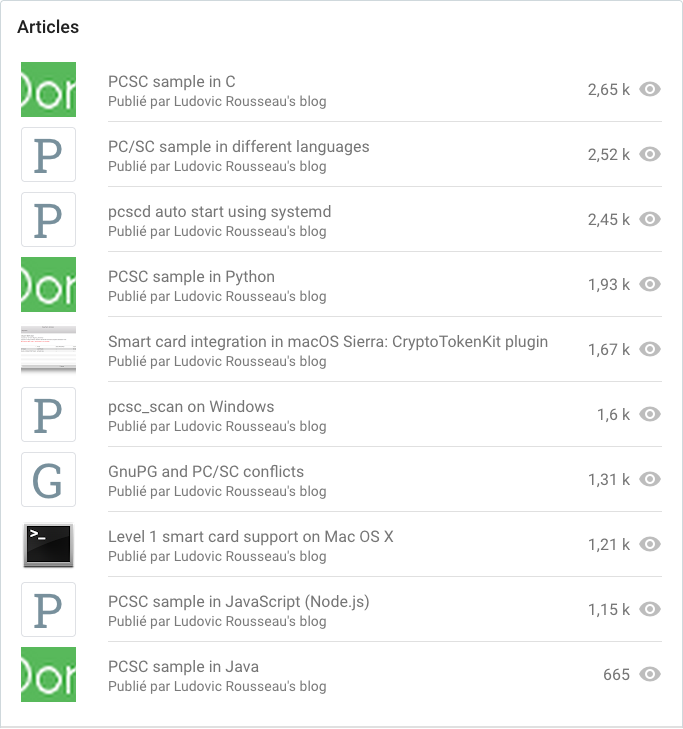
Most read articles

This year again articles about sample code in different languages are popular.

The article about pcsc_scan on Windows moved from the 8th to the 6th place in the top 10. Maybe I should write more about Windows? ☺


Conclusion

Thank you to you, readers.

This blog has no advertising. If you want to support me you can send me some bitcoins or become a github sponsor.

Monday, December 27, 2021

Windows PC/SC and SCARD_E_SERVICE_STOPPED (part 2)

In a previous blog article " Windows PC/SC and SCARD_E_SERVICE_STOPPED " I presented a problem on Windows when the last reader is disconnected.

After a discussion on the pcsclite-muscle mailing list I got nice feedback.Thanks.

Diego de Felice gave a reference to a Microsoft documentation from 2016 "What's New in Smart Cards"

Smart Card Service start and stop behavior

Smart card reader detection logic has been added so that the Smart Card Service runs only when appropriate. On Windows Server 2012 and Windows 8, the Smart Card Service (scardsvr) automatically starts when the user connects a smart card reader and automatically stops when a user removes a smart card reader and no other smart card reader is connected to the computer. On startup, the Smart Card Service automatically starts if a reader was previously connected to the computer but a reader is not currently connected to the system. If no smart card readers are connected to the computer, the service will automatically shut down one minute after the last API call into the Smart Card Service. If a reader was never previously connected to the computer, the service will not start automatically.

So the (strange) behavior is documented by Microsoft.

Stephan Brunner then gave a solution: establish a new context.


Source code

I wanted to test the hack proposed by Stephan.

#! /usr/bin/env python3

from smartcard.scard import *
from smartcard.pcsc.PCSCExceptions import *
import time

hresult, hcontext = SCardEstablishContext(SCARD_SCOPE_USER)
if hresult != SCARD_S_SUCCESS:
    raise EstablishContextException(hresult)

i = 0
while True:
    hresult, readers = SCardListReaders(hcontext, [])
    exc = BaseSCardException(message="", hresult=hresult)
    print('(%d) %s:' % (i, str(exc)), readers)
    if not hresult in [SCARD_S_SUCCESS, SCARD_E_NO_READERS_AVAILABLE]:
        hresult, hcontext = SCardEstablishContext(SCARD_SCOPE_USER)
        if hresult != SCARD_S_SUCCESS:
            raise EstablishContextException(hresult)

    time.sleep(1)
    i += 1

Output

(base) C:\Users\ludovic\Documents>python SCardListReaders.py
(0) : Impossible de trouver un lecteur de carte ŕ puce.  (0x8010002E): []
(1) : Impossible de trouver un lecteur de carte ŕ puce.  (0x8010002E): []
(2) : Impossible de trouver un lecteur de carte ŕ puce.  (0x8010002E): []
(3) : Impossible de trouver un lecteur de carte ŕ puce.  (0x8010002E): []
(4) : L’opération a réussi.  (0x00000000): ['Generic EMV Smartcard Reader 0']
(5) : L’opération a réussi.  (0x00000000): ['Generic EMV Smartcard Reader 0']
(6) : L’opération a réussi.  (0x00000000): ['Generic EMV Smartcard Reader 0']
(7) : L’opération a réussi.  (0x00000000): ['Generic EMV Smartcard Reader 0']
(8) : L’opération a réussi.  (0x00000000): ['Generic EMV Smartcard Reader 0']
(9) : Le gestionnaire de ressources des cartes ŕ puce s’est arręté.  (0x8010001E): []
(10) : Impossible de trouver un lecteur de carte ŕ puce.  (0x8010002E): []
(11) : Impossible de trouver un lecteur de carte ŕ puce.  (0x8010002E): []
(12) : Impossible de trouver un lecteur de carte ŕ puce.  (0x8010002E): []
(13) : L’opération a réussi.  (0x00000000): ['Generic EMV Smartcard Reader 0']
(14) : L’opération a réussi.  (0x00000000): ['Generic EMV Smartcard Reader 0']
(15) : L’opération a réussi.  (0x00000000): ['Generic EMV Smartcard Reader 0']
(16) : L’opération a réussi.  (0x00000000): ['Generic EMV Smartcard Reader 0']
(17) : Le gestionnaire de ressources des cartes ŕ puce s’est arręté.  (0x8010001E): []
(18) : Impossible de trouver un lecteur de carte ŕ puce.  (0x8010002E): []
(19) : Impossible de trouver un lecteur de carte ŕ puce.  (0x8010002E): []

Description

Step 0, I start the script with no smart card reader connected. So SCardListReaders() returns the expected 0x8010002E which is SCARD_E_NO_READERS_AVAILABLE.

Step 4, Then I connect a smart card reader.

Step 9, Then I disconnect the smart card reader and SCardListReaders() returns the unexpected error 0x8010001E i.e. SCARD_E_SERVICE_STOPPED.

The program then calls SCardEstablishContext() again, with success, and continue.

Step 10, The next call to CardListReaders() returns the expected 0x8010002E. So I guess the PC/SC resource manager has been  re-started. 

Step 13, Connecting a new smart card reader works fine and the reader is detected.

Step 17, I disconnect the reader and I get again the SCARD_E_SERVICE_STOPPED error.

Without the hack

If the code does not establish a new context then CardListReaders() will return SCARD_E_SERVICE_STOPPED for ever. And if I connect a new reader it is not detected.

I think this behavior explains the bug reported in CardRequest waitforcard ATR can't see reconnected readers on Windows (regression) #123.


Conclusion

Ignoring SCARD_E_SERVICE_STOPPED, as I did in commit 5b43ef5, is not a correct solution. I have to work on a better solution (just for Windows).